วันศุกร์ที่ ๑๒ ตุลาคม พ.ศ. ๒๕๕๐

การสร้างเลขลำดับแถวในตารางข้อมูล (Create row number in Gridview)

เลขลำดับแถว (row number) คือ เลขที่เรียงจาก 1 ถึงจำนวนสุดท้ายของข้อมูล ส่วนใหญ่จะเอาไว้เป็น column แรกสุดของตาราง ในกรณีนี้คือ ตาราง Gridview ที่มีการ biding ข้อมูลมาจากฐานข้อมูลนะครับ ดังรูปข้างล่าง

วิธีการสร้างก็มีอยู่ 2 วิธี คือ
1. กำหนดไว้ในคำสั่ง SQL
2. กำหนด column เพิ่มไว้ใน Gridview แล้วสร้าง label หรือ control ที่ต้องการไว้ข้างใน

สำหรับผมแล้ววิธีที่ 2 ค่อนข้างยุ่งยากและเขียนโค้ดยาวกว่า เพราะต้องมาคอยกำหนดเลขใหม่ตอน Databound ทุกครั้ง และผมจึงได้ใช้วิธีที่ 1 ซึ่งสะดวกกว่ามากครับ โดยการกำหนดสั่งใน SQL ก็แค่ไปแทรกไว้ในส่วนหลังคำสั่ง Select เท่านั้นเอง เช่น

จาก
SELECT CustomerID, CustomerName, CustomerAddress FROM tblCustomer

เป็น
SELECT Row_Number() OVER(ORDER BY CustomerID) AS RowNo, CustomerID, CustomerName, CustomerAddress FROM tblCustomer

และในการนำเลขลำดับแถวที่ได้จากการ query ก็เพียงกำหนด properties ชื่อ DataField ใน column ที่ต้องการเป็น RowNo เท่านั้น (ชื่อสามารถเปลี่ยนได้ตามต้องการ)

แหล่งข้อมูล :
displaying gridview row index number
Row number to gridview - dotnetspider
How to display row numbers in GridView - MSDN - Create column
Display Row number count increment in grid view using template column

วันพฤหัสบดีที่ ๔ ตุลาคม พ.ศ. ๒๕๕๐

เข้ารหัส/ถอดรหัส ด้วย Monoalphabetic Substitution Cipher โดยใช้ VB.NET (Monoalphabetic Substitution Cipher with VB.NET)

(ผมได้ทำการ implement การเข้าและถอดรหัส Monoalphabetic Substitution Cipher นี้ เป็น project ใน codeplex.com แล้วนะครับ ถ้าต้องการดูตัวอย่าง source code ซึ่งตอนนี้คือ version 1.0 beta กรุณาไป download ที่ http://www.codeplex.com/MonoalphabetCipher)

การเข้ารหัส/ถอดรหัสด้วยอัลกอรึทึม Monoalphabetic Substitution นั้น ถือว่าไม่มีความสลับซับซ้อนทางคณิตศาสตร์แต่อย่างใด เพียงมีตารางการแทนที่ที่ตกลงกันไว้เท่านั้น ตัวอักษรที่จะนำแทนที่ก็กำหนดได้อย่างอิสระ ไม่จำเป็นต้องเรียงลำดับตัวอักษร ดังรูป ซึ่งในการเขียนโปรแกรม อาจนำชุดตัวอักษรสำหรับแทนที่มาเก็บเป็น key

ตัวอย่างโค้ดการเข้ารหัสแบบ Monoalphabetic Substitution Cipher

'Key ในที่นี้ ต้องเป็นตัวอักษรภาษาอังกฤษ 26 ตัว
'ซึ่งต้องไม่ซ้ำกัน และเป็นตัวเล็กหรือตัวใหญ่ก็ได
Function Encrypt(ByVal PlainText As String, ByVal Key As String) As String
Dim CharArray(PlainText.Length - 1) As Char
Dim KeyTable As New System.Collections.Specialized.ListDictionary

'สร้างตารางแทนที่ โดยให้ 65,97 คือ A,a ... 90,122คือ Z,z
For Count As Byte = 0 To 25
KeyTable.Add((Count + 65).ToString, Key(Count).ToString.ToUpper)
KeyTable.Add((Count + 97).ToString, Key(Count).ToString.ToLower)
Next

For Count As Byte = 0 To PlainText.Length - 1
'แปลงตัวอักษรใน plain text เป็นรหัส ASCII
'แล้วนำรหัส ASCII ไปหาค่าในตารางแทนที่
CharArray(Count) = KeyTable.Item(Asc(PlainText(Count)).ToString)
Next

Return CharArray
End Function

ตัวอย่างโค้ดการเข้ารหัสแบบ Monoalphabetic Substitution Cipher

Function Decrypt(ByVal CipherText As String, ByVal Key As String) As String
Dim CharArray(CipherText.Length - 1) As Char
Dim KeyTable As New System.Collections.Specialized.ListDictionary

'สร้างตารางแทนที่ โดยให้ A,a คือ 65,97 ... Z,z คือ 90,122
For Count As Byte = 0 To 25
KeyTable.Add(Key(Count).ToString.ToUpper, (Count + 65).ToString)
KeyTable.Add(Count).ToString.ToLower, (Count + 97).ToString)
Next

For Count As Byte = 0 To CipherText.Length - 1
'หารหัส ASCII จากตารางแทนที่ แล้วนำไปแปลงเป็นตัวอักษร
CharArray(Count) = Chr(KeyTable.Item(CipherText(Count).ToString))
Next

Return CharArray
End Function


แหล่งข้อมูล :
Substitution cipher
โปรแกรม encrypt/decrypt ด้วย monoalphabetic
Monoalphabetic Cipher - The Black Chamber

เข้ารหัส/ถอดรหัส ด้วย Rail Fence Cipher โดยใช้ VB.NET (Rail Fence Transposition Cipher with VB.NET)

(ผมได้ทำการ implement การเข้าและถอดรหัส Rail Fence Cipher นี้ เป็น project ใน codeplex.com แล้วนะครับ ถ้าต้องการดูตัวอย่าง source code ซึ่งตอนนี้คือ version 1.0 beta กรุณาไป download ที่ http://www.codeplex.com/RailFenceCipher)

Rail Fence Cipher หรือที่เรียกกันว่า อัลกอรึทึมแบบแนวรั้ว เป็นอัลกอรึทึมแบบ Transposition หรือแบบสลับตำแหน่งอีกแบบหนึ่ง ซึ่งมีแนวคิดมาจากวิธีส่งข้อความลับทางการทหาร ของชาวสปาตัน (Spartans) ในยุคกรีกโบราณ อุปกรณ์ประกอบด้วย ไม้กระบอกเหลี่ยมกับเส้นหนังสัตว์ยาวที่สลักตัวอักษรไว้ วิธีใช้ต้องนำสายหนังมาพันรอบแท่งกระบอกเหลี่ยม แล้วอ่านตามยาวของแท่งกระบอก ก็ถือเป็นการถอดรหัสแล้ว ดังรูป

การใช้งานจริง การเข้ารหัสแบบ Rail Fence Cipher จะมีการกำหนด key ซึ่งใช้เป็นจำนวนแถวของผลลัพธ์ ดังนั้น ต้องนับจำนวนตัวอักษรในข้อความที่เป็น plain text แล้วนำมาหารด้วย key จะได้จำนวน column ของผลลัพธ์ (กรณีมีเศษให้ปักขึ้นอีก 1) ตอนนี้ให้นึกถึงรูปเมตริกซ์ 2 มิติ แล้วนำข้อความ plain text มาเขียนใหม่ในเมตริกซ์จากบนลงล่างทีละ column จนหมด เสร็จนำข้อความในเมตริกซ์จากซ้ายไปขวา ทีละแถว มาเขียนเป็นข้อความเรียงแถวเดียว ก็จะได้ข้อความที่ถูกเข้ารหัสแล้ว

ตัวอย่างโค้ดการเข้ารหัสแบบ Rail Fence Cipher

Function Encrypt(ByVal PlainText As String, ByVal Key As Byte) As String
'หาจำนวน column
Dim ColumnNum As Byte = PlainText.Length \ Key
If (PlainText.Length Mod Key) > 0 Then ColumnNum += 1

Dim CharMatrix(Key - 1, ColumnNum - 1) As Char
Dim CharArray(CharMatrix.Length - 1) As Char

'นำตัวอักษรใน PlainText มาเรียงในเมตริกซ์ (Array 2 มิติ)
'เรียงจากบนลงล่างทีละคอลัมน์
Dim Count As Byte = 0
For CountCol As Byte = 0 To ColumnNum - 1
For CountRow As Byte = 0 To Key - 1
If Count <= PlainText.Length - 1 Then
CharMatrix(CountRow, CountCol) = PlainText(Count)
Count += 1
Else
CharMatrix(CountRow, CountCol) = Nothing
End If
Next CountRow
Next CountCol

'อ่านตัวอักษรในเมตริกซ์ จากซ้ายไปขวา ทีละแถว
'มาเรียงเป็นข้อคาวมแถวเดียว
Count = 0
For CountRow As Byte = 0 To Key - 1
For CountCol As Byte = 0 To ColumnNum - 1
If Not CharMatrix(CountRow, CountCol) = Nothing Then
CharArray(Count) = CharMatrix(CountRow, CountCol)
Count += 1
End If
Next CountCol
Next CountRow

'ส่งค่าตัวอักษรที่เป็น array กลับเป็น string
Return CharArray
End Function

ตัวอย่างโค้ดการถอดรหัสแบบ Rail Fence Cipher

Function Decrypt(ByVal CipherText As String, ByVal Key As Byte) As String
'หาจำนวน column
Dim ColumnNum As Byte = CipherText.Length \ Key
If (CipherText.Length Mod Key) > 0 Then ColumnNum += 1

'หาจำนวน cell ว่าง
Dim EmptyNum As Byte
Dim CharTotal As Byte = CipherText.Length
EmptyNum = IIf(CharTotal Mod Key = 0, 0, Key - (CharTotal Mod Key))

Dim CharMatrix(Key - 1, ColumnNum - 1) As Char
Dim CharArray(CharMatrix.Length - 1) As Char

'นำตัวอักษรใน cipher text มาเรียงในเมตริกซ์ (Array 2 มิติ)
'เรียงจากซ้ายไปขวา ทีละแถว
Dim Count As Byte = 0
For CountRow As Byte = 0 To Key - 1
'แถวที่ไม่มีช่องว่าง
If CountRow <= (Key - 1 - EmptyNum) Then
For CountCol As Byte = 0 To ColumnNum - 1
CharMatrix(CountRow, CountCol) = CipherText(Count)
Count += 1
Next CountCol
Else 'แถวที่มีช่องว่าง
For CountCol As Byte = 0 To ColumnNum - 2 CharMatrix(CountRow, CountCol) = CipherText(Count)
Count += 1
Next CountCol
End If
Next CountRow

'อ่านตัวอักษรในเมตริกซ์ จากบนลงล่างทีละคอลัมน์
'มาเรียงเป็นข้อความแถวเดียว
Count = 0
For CountCol As Byte = 0 To ColumnNum - 1
For CountRow As Byte = 0 To Key - 1
If Not CharMatrix(CountRow, CountCol) = Nothing Then
CharArray(Count) = CharMatrix(CountRow, CountCol)
Count += 1
End If
Next CountRow
Next CountCol

'ส่งค่าตัวอักษรที่เป็น array กลับเป็น string
Return CharArray
End Function


ข้อควรสังเกตในอัลกอรึทึม คือ ช่องว่างที่อยู่ในเมตริกซ์ (Array) ซึ่งเกิดจากจำนวนตัวอักษรไม่พอดีกับจำนวน cell ในเมตริกซ์ อาจจะทำให้เกิดข้อผิดพลาดหรือเรียงข้อมูลไม่ถูกต้องได้ การถอดรหัสค่อนข้างยุ่งยากกว่าเข้ารหัส เนื่องจากต้องคำนวณหาช่องว่างจากข้อความ cipher text

แหล่งข้อมูล
Rail Fence Cipher - wikipedia
Scytale - wikipedia
Transposition cipher - wikipedia
Rail Fence Cipher - The Black Chamber - โปรแกรม (JavaScript)
The Rail-Fence Cipher - math.temple.edu - โปรแกรม (JavaScript)
The Crypto Tutorial - แบบฝึกหัดมากมาย
ข้อสอบ Mid-Term ของ Mount Holyoke College อเมริกา (CS100 วิชาคอมเบื้องต้น)

วันพุธที่ ๓ ตุลาคม พ.ศ. ๒๕๕๐

เข้ารหัสข้อความ แบบ Caesar Shift Cipher โดยใช้ VB.NET (Caesar Shift Cipher with VB.NET)

(ผมได้ทำการ implement การเข้าและถอดรหัส Caesar Shift Cipher นี้ เป็น project ใน codeplex.com แล้วนะครับ ถ้าต้องการดูตัวอย่าง source code ซึ่งตอนนี้คือ version 1.0 กรุณาไป download ที่ http://www.codeplex.com/CaesarShiftCipher ผมได้เขียนไว้ทั้ง 2 ภาษา คือ VB.NET และ C# --- update เมื่อ 25 กันยายน 2550)

เนื่องจากใน Framework ของ .NET มี class ที่เกี่ยวข้องกับ security มากมาย รวมถึงมี class ที่เกี่ยวข้องกับการเข้ารหัส/ถอดรหัส เช่น MD5, DES, RSA ซึ่งส่วนใหญ่เป็นอัลกอรึทึมที่ไม่ใช่แบบพื้นฐาน หรือแบบ classic เช่น algorithm แบบ caesar shift, monoalphabetic substitution, route, rail fence เป็นต้น

ผมจึงเขียนโค้ดที่ implement อัลกอรึทึมแบบ classic ที่ว่านี้ ไว้ให้นักศึกษา หรือผู้สนใจทั่วไปได้ไปศึกษากัน โดย algorithm แรก คือ Caesar Shift Cipher

Caesar Shift Cipher หรือที่เรียกว่าอัลกอรึทึมแบบเลื่อน ทำงานโดยการแทนข้อความต้นฉบับ ด้วยตัวอักษรถัดไปจำนวน k ตัว (โดย k คือ ตัวเลข ซึ่งนำมาใช้เป็น Key) อัลกอรึทึมนี้ถูกนำมาใช้ในสมัย จูเลียส ซีซาร์ (Julius Caesar) การใช้งานเช่น เข้ารหัสตัวอักษร A ด้วย key เป็น 3 ดังนั้นผลลัพธ์คืออักษรถัดไปจาก A 3 ตัว ซึ่งก็คือ D เป็นต้น

ตัวอย่างอัลกอรึทึม Caesar Shift Cipher ที่เขียนด้วย VB.NET

Function Encrypt(ByVal PlainText As String, ByVal Key As Byte) As String
'แปลง plaintext ที่เป็น string ให้เป็น array ของตัวอักษร
Dim PlainChar() As Char = PlainText.ToCharArray()
Dim Ascii(PlainChar.Length) As Byte

For Count As Byte = 0 To PlainChar.Length - 1
'แปลงตัวอักษรเป็นรหัส ASCII ที่เป็นตัวเลข
Ascii(Count) = CByte(Asc(PlainChar(Count)))

'คัดเฉพาะตัวอักษร A-Z และ a-z นอกนั้นไม่มีการเข้ารหัส
'A-Z มีรหัส ASCII เป็น 65-90
'a-z มีรหัส ASCII เป็น 97-122
If Ascii(Count) >= 65 And Ascii(Count) <= 90 Then
Ascii(Count) -= 65 'ให้ A-Z มีค่าเริ่มต้นจาก 0 ถึง 25 ตามลำดับ
Ascii(Count) = (Ascii(Count) + Key) Mod 26 Ascii(Count) += 65
'สามารถเขียนให้อยู่ในบรรทัดเดียวได้
'Ascii(Count) = ((Ascii(Count) - 65 + Key) Mod 26) + 65
ElseIf Ascii(Count) >= 97 And Ascii(Count) <= 122 Then
Ascii(Count) -= 97 'ให้ a-z มีค่าเริ่มต้นจาก 0 ถึง 25 ตามลำดับ
Ascii(Count) = (Ascii(Count) + Key) Mod 26
Ascii(Count) += 97
'สามารถเขียนให้อยู่ในบรรทัดเดียวได้
'Ascii(Count) = ((Ascii(Count) - 97 + Key) Mod 26) + 97
End If

'แปลงตัวเลข ASCII กลับเป็นตัวอักษร
PlainChar(Count) = Chr(Ascii(Count))
Next

'ส่งค่าตัวอักษรที่เป็น array กลับเป็น string
Return PlainChar
End Function


สำหรับการถอดรหัสให้เปลี่ยนจาก
Ascii(Count) = (Ascii(Count) + Key) Mod 26
เป็น
Ascii(Count) = (26 + Ascii(Count) + Key) Mod 26

ฟังก์ชั่นนี้จะต้องรับค่า ข้อความที่เป็น string และ key ที่เป็นตัวเลขมาเข้ารหัส และ return ค่า ข้อความที่เข้ารหัสแล้วเป็น string ซึ่งสามารถใช้กับตัวอักษรภาษาอังกฤษ A-Z ทั้งตัวพิมพ์เล็กและใหญ่ได้ เพราะมีการใช้รหัส ASCII มาช่วยในการระบุตำแหน่งตัวอักษร ถ้าจะให้มีการใช้กับภาษาอื่นๆ ได้ ต้องมีการคำนวณตัวเลขจากรหัส Unicode และตัวอย่างนี้ไม่ได้ตรวจสอบ user input หรือดักจับข้อผิดพลาด ดังนั้นถ้าจะนำไปใช้ก็ควรนำไปประยุกต์อีกที คำอธิบายประกอบอยู่ในโค้ดแล้ว ถ้าไม่เข้าใจก็ comment ถามมาได้นะครับ

ส่วนของคนอื่นที่เขียนไว้ก็มีของ Deobrat Singh ชาวอินเดียที่เขียนไว้สั้นมากๆ ในเว็บ The Code Project ข้อเสียคือไม่มีการจำกัดตัวอักษร ซึ่งเมื่อเข้ารหัสตัวอักษรท้ายๆ เช่น Z จะไม่วนกลับมาที่ A, B, C , ... ใหม่ ข้อดีคือง่ายและใช้ได้กับหลายภาษา

ชุดคำสั่งสำคัญ ของ Deobrat Singh

cipherInChars(i) = Convert.ToChar((Convert.ToInt32( _
Convert.ToChar(plainText(i))) + Me.ShiftCount))


นำมาปรับลดคำสั่งการแปลงชนิดข้อมูลอีกนิดหน่อย

Function Encrypt(ByVal PlainText As String, ByVal Key As Byte) As String
Dim PlainChar(PlainText.Length - 1) As Char

For Count As Byte = 0 To PlainText.Length - 1
'ในกรณี Decrypt ให้เปลี่ยนจากเครื่องหมายบวกเป็นลบ
PlainChar(Count) = ChrW(AscW(PlainText(Count)) + Key)
Next

'ส่งค่าตัวอักษรที่เป็น array กลับเป็น string
Return PlainChar
End Function


อีกคน คือ Ghaith Nizar Sinjab ชาวซีเรีย (syria) เขียนไว้ค่อนข้างยาว ซึ่งเป็นตัวอย่างของการพยายามให้รองรับได้หลายภาษา ในที่นี้เค้าทำเป็นตัวอย่างไว้เพียง 2 ภาษา ในที่นี้จะไม่ขออธิบายถึง

สำหรับข้อมูลอื่นๆ ที่ควรรู้คือ ก-ฮ ใน Unicode คือเลข 3585-3630

ปล. ใครต้องการเขียนเป็น JavaScript ลองดูที่เว็บ Black Chamber (ceasar.js) หรือ java2s นะครับ

แหล่งข้อมูล
Caesar cipher - wikipedia
Transposition cipher - wikipedia
Caesar cipher - The Black Chamber
Caesar Cipher in JavaScript - java2s
Implementing Caesar Cipher in VB.NET - The Code Project - Deobrat Singh
Caeser Cipher v1.0 - Ghaith Nizar Sinjab

วันเสาร์ที่ ๒๒ กันยายน พ.ศ. ๒๕๕๐

การขึ้นบรรทัดใหม่ในข้อความ (Newline in string)

เรื่องการขึ้นบรรทัดใหม่ในข้อความนี้ ก็ถือเป็นเรื่องพื้นฐานที่ควรทำความเข้าใจสำหรับมือใหม่นะครับ ถ้าจะพูดกันจริงๆ ก็ต้องพูดตั้งแต่ระบบปฏิบัติการ เพราะในอนาคตอาจจะต้องใช้ .NET บน Unix ก็เป็นได้ โดย syntax การขึ้นบรรทัดใหม่บน Unix ส่วนใหญ่ จะเป็น \n (backslash n) เช่น korn shell, bash shell, ภาษา C เป็นต้น ส่วน c shell นั้น ใช้ \ ตัวเดียวซึ่งมีเงื่อนไขการใช้เหมือนกัน ถ้าสนใจศึกษาก็ลองดูจากลิ้งค์ข้างล่างนะครับ

แต่สำหรับ DOS จะใช้ \r\n (\r แทน return ซึ่งมาจากปุ่ม return บน keyboard ของเครื่อง mini computer หรือ mainframe ปุ่มนี้บน keyboard ของเครื่อง PC ในปัจจุบัน คือ ปุ่ม enter ส่วน \n คือ newline นั้นเอง) ซึ่งก็สืบทอดมาใช้บนระบบ Windows จนถึง .NET Framework ด้วย

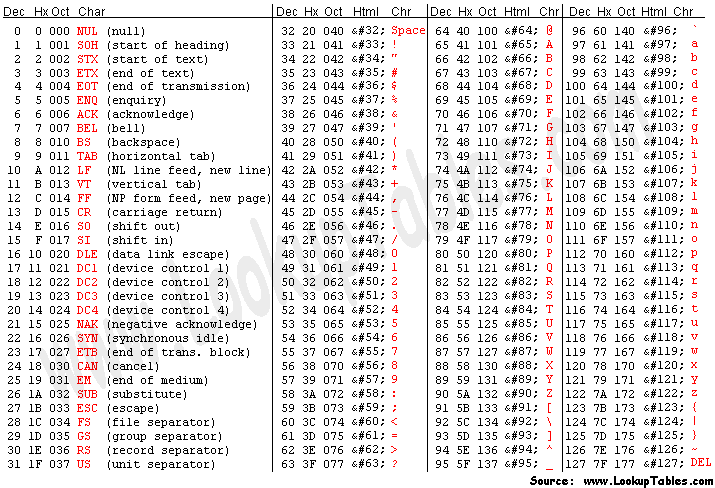
สำหรับรายละเอียดของ \r และ \n ก็มีที่มาจาก ASCII code โดยถ้าดูจากตาราง (กรุณาดูในลิ้งค์ข้างล่างประกอบ) จะพบว่ารหัสที่ 1-32 และรหัสที่ 127 เป็นรหัสที่ไม่มีการแสดงผลบนหน้าจอ ซึ่ง \r และ \n ก็คือ หนึ่งในนั้น


\r เรียกว่า CR (carriage return) แทน ^M เลขฐานสิบเป็น 13 (เลขฐานสิบหกเป็น 0D)
\n เรียกว่า LF (line feed) แทน ^J เลขฐานสิบเป็น 10 (เลขฐานสิบหกเป็น 0A)

ใน .NET Framework ได้มีพร็อพเพอร์ตี้ NewLine ในคลาส Environment ให้เลือกใช้ ซึ่งจำเป็นต้องใช้ในกรณีที่ต้องการ cross platform เพราะ NewLine ให้ค่าบรรทัดใหม่ตาม OS ที่ .NET Framework ติดตั้งอยู่ ถ้าไม่ใช้ Environment.NewLine การเขียนโปรแกรมก็จะขึ้นอยู่กับแต่ละภาษา ดังตัวอย่างข้างล่าง

สำหรับภาษา VB.NET

Dim NewlineTesting As New System.Text.StringBuilder

'Convert number of ASCII to Charecter
'Char(เลขฐานสิบใน ASCII) คือ การแปลงรหัส ASCII เป็น Charecter
NewlineTesting.Append("This is first line" + Chr(13) + Chr(10))

'vbCr, vbLf and vbCrLf คือค่าคงที่ใน Namespace ชื่อ Microsoft.VisualBasic
'vbCr, vbLf and vbCrLf are constant value in Microsoft.VisualBasic
NewlineTesting.Append("This is second line" + vbCr + vbLf)
NewlineTesting.Append("This is third line" + vbCrLf)

'For implement in Windows Form
'กรณีเขียน Win. App. สามารถใช้ Keys.Return และ Keys.LineFeed ได้ ซึ่งช่วยกรณีที่จำรหัส ASCII ไม่ได้
NewlineTesting.Append("This is forth line" + Chr(Keys.Return) + Chr(Keys.LineFeed))

'Environment.NewLine is platform independence new line
'Environment.NewLine เป็นการขึ้นบรรทัดใหม่โดยใช้ได้กับทั้ง VB และ C# ซึ่งไม่ขึ้นกับ OS ด้วย
NewlineTesting.Append("This is fifth line" + Environment.NewLine)

NewlineTesting.Append("This is sixth line")

สำหรับภาษา C#

StringBuilder newlineTesting = new StringBuilder();
newlineTesting.Append("This is first line \r\n");
newlineTesting.Append("This is second line" + Environment.NewLine);
newlineTesting.Append("This is third line");

แหล่งข้อมูล :
ASCII Table
ASCII Code Table
VB.NET string method to handle escape sequences
Using CR and LF: The Options. (VB.NET)
Top Ten Reasons not to use the C shell
Learning the Korn Shell, 2nd Edition
\n ไม่เท่ากับการขึ้นบรรทัดใหม่บน Windows

วันอังคารที่ ๑๘ กันยายน พ.ศ. ๒๕๕๐

Northwind อยู่ไหน (Where is northwind in SQL Server 2005?)

สำหรับคนที่ใช้ผลิตภัณฑ์ฐานข้อมูลของไมโครซอฟต์ ไม่ว่าจะเป็น MS Access, SQL Server 7.0, 2000 คงคุ้นเคยกับฐานข้อมูลตัวอย่างที่มีมาให้ในชื่อ Northwind และ แต่สำหรับ SQL Server 2005 กลับหายไป ผมเพิ่งสังเกตตอนจะใช้ทดสอบโปรแกรม พอหาข้อมูลก็รู้ว่า ทางไมโครซอฟต์เก็บไว้ในลิ้นชักไปแล้วครับ เพราะว่าไม่ใช่ตัวอย่างที่ดีพอในการ implement ตัว analysis services หรือ reporting services (แต่ในรุ่น SQL Server Compact Edition ยังใช้ northwind อยู่ครับ) แต่ก็พอหาโหลด northwind ได้ที่ Northwind and pubs Sample Databases for SQL Server 2000 แต่กระนั้นทางไมโครซอฟต์ก็แนะนำว่าถ้าใช้ SQL Server 2005 ก็ใช้ฐานข้อมูลตัวอย่างตัวใหม่ดีกว่า ในชื่อ AdventureWorks ซึ่งไปเก็บไว้ใน codeplex ตามไป download ได้ที่ Microsoft SQL Server Samples and Community Projects ในโครงการนี้ยังพบตัวอย่างอีกหลายๆ script หรือข้อมูลที่ใช้กับ Analysis Services, Integration Services (DTS), Reporting Services, Transact SQL Scripts, XML etc. ถ้าขี้เกียจอ่านอะไรมากมายก็มาลิ้งนี้เลยดีกว่าครับ Sample Databases for Microsoft SQL Server 2005 SP2 licensed with the MS-PL license.

ปล. การใช้ northwind ใน SQL Server 2005 ต้องเซต properties ฐานข้อมูลให้ใช้ 90 compatibility level ก่อนนะครับ หรือลองอ่านเพิ่มเติมที่ NorthWind Database for SQL Server 2005 and installation method

แหล่งข้อมูลเพิ่มเติม :
Download details: SQL Server 2005 Compact Edition Developer SDK
Where is the Northwind SQL scripts for SQL server 2005
Sample Databases in SQL Server 2005 - Jeff Atwood blog
SQL SERVER - 2005 NorthWind Database or AdventureWorks Database - Samples Databases - Pinal Dave

วันศุกร์ที่ ๓๑ สิงหาคม พ.ศ. ๒๕๕๐

การออกแบบ xml เพื่อใช้กับ DataSet อ็อบเจ็ค (XML structure for DataSet)

มีคนถามมาว่าทำไมมีแต่บทความพื้นๆ จัง คือ ที่จริงผมตั้งใจจะเรียงลำดับตามหนังสือที่ผมอ่านครับ แต่เมื่อมีคนถามเข้า และประจวบกับผมจะเอาความรู้บางอย่างที่ใช้ในการทำงาน มาเก็บเอาไว้ เพราะผมลืมสิ่งที่ทำไปแล้วง่ายมากๆ วันนี้มีโอกาสได้ใช้เกี่ยวกับไฟล์ XML ซึ่งใช้ในการเก็บข้อมูลบางอย่าง แล้วต้องมีการนำข้อมูลในไฟล์ขึ้นมาใช้

โดยทั่วไป ถ้าเรานึกถึงไฟล์ เราก็ต้องนึกถึง เนมสเปส (Namespace) ที่ชื่อ IO ดังนั้นในการไปติดต่อกับไฟล์ XML จึงต้องใช้อ็อบเจ็คของคลาสใน IO ไปติดต่อ แต่ผมต้องการเขียนโค้ดสั้นๆ และง่ายๆ จึงใช้ DataSet ตัวเดียว แทนการใช้ Syste.IO มาใช้ในการดึงข้อมูลจากไฟล์ XML และทั้งเก็บข้อมูลไว้ในตัวมัน ซึ่งสะดวกจริงๆ ครับ ไม่ต้องมานั่งหา node เพื่อดึงข้อมูล

ก่อนอื่นเราต้องสร้างไฟล์ XML ของเราขึ้นมาก่อนครับ ผมขอยกตัวอย่างและอธิบายเลยนะครับ
โครงสร้าง XML ต่อไปนี้ คือตัวอย่างของการสร้าง dataset ที่มี 1 ตาราง 1 คอลัมน์ และ 1 แถว

<?xml version="1.0" encoding="utf-8" ?>
<datasetName>
<tableName>
<columnName>data on row</columnName>
</tableName>
</datasetName>

ถ้าต้องการหลายๆ แถว โครงสร้าง XML จะต้องเพิ่มตั้งส่วนที่เป็นชื่อตารางเข้าไป

<?xml version="1.0" encoding="utf-8" ?>
<datasetName>
<tableName>
<columnName>data on row1</columnName>
</tableName>
<tableName>
<columnName>data on row2</columnName>
</tableName>
<tableName>
<columnName>data on row3</columnName>
</tableName>
</datasetName>


ส่วนการเพิ่มคอลัมน์ก็ต้องเพิ่มชื่อคอลัมน์ไปทุกๆ แถวๆเลยนะครับ

<?xml version="1.0" encoding="utf-8" ?>
<datasetName>
<tableName>
<columnName1>data on row1</columnName1>
<columnName2>data on row1</columnName2>
</tableName>
<tableName>
<columnName1>data on row2</columnName1>
<columnName2>data on row1</columnName2>
</tableName>
<tableName>
<columnName1>data on row3</columnName1>
<columnName2>data on row1</columnName2>
</tableName>
</datasetName>


และสุดท้ายก็เป็นที่รู้กันครับว่า ใน dataset สามารถเก็บตารางได้หลายตาราง ดังนั้นต้องแสดงกรณีต้องการหลายๆ ตารางครับ โครง XML เป็นดังนี้

<?xml version="1.0" encoding="utf-8" ?>
<datasetName>
<!-- Table 1 -->
<tableName1>
<columnName1>data on row1</columnName1>
<columnName2>data on row1</columnName2>
</tableName1>
<tableName1>
<columnName1>data on row2</columnName1>
<columnName2>data on row2</columnName2>
</tableName1>
<tableName1>
<columnName1>data on row3</columnName1>
<columnName2>data on row3</columnName2>
</tableName1>
<!-- Table 2 -->
<tableName2>
<columnName1>data on row1</columnName1>
<columnName2>data on row1</columnName2>
<columnName3>data on row1</columnName3>
</tableName2>
<tableName2>
<columnName1>data on row2</columnName1>
<columnName2>data on row2</columnName2>
<columnName3>data on row2</columnName3>
</tableName2>
</datasetName>


และสุดท้ายก็คือ การดึงข้อมูลจาก XML ไฟล์ ด้วย DataSet ซึ่งก็ง่ายนิดเดียวครับ แค่บรรทัดเดียว (สร้าง object ds ไว้ก่อนด้วยนะครับ เดี๋ยว error)

'สำหรับ VB.NET
ds.ReadXml("c:\example.xml")

//สำหรับ C#
ds.ReadXml(@"c:\example.xml");

ถ้าแก้ไขข้อมูลแล้วจะเก็บลงคืน XML ไฟล์ ก็บรรทัดเดียวอีกเหมือนกันครับ

'สำหรับ VB.NET
ds.WriteXml("c:\example.xml")

//สำหรับ C#
ds.WriteXml(@"c:\example.xml");


ลองนำไปประยุกต์ใช้ดูครับ และอย่าลืมว่า syntax ของ XML เป็นแบบ case sensitive นะครับ

วันพฤหัสบดีที่ ๒๓ สิงหาคม พ.ศ. ๒๕๕๐

Shared Source ลิขสิทธิ์แบบโอเพ่นซอร์สของไมโครซอฟต์ (Shared Source Licenses)

เรามาลองดูกันว่า Shared Source Licenses นี้ จะทำให้ชาว Open Source พอใจแค่ไหน เริ่มจากประเภทของ Licenses ที่จะแบ่งออกเป็น 2 ประเภท คือ

1. Microsoft Public License (Ms-PL) ประเภทนี้จะอนุญาตให้เราดู แก้ไข(
modify) แจกจ่าย(redistribute) ซอร์สโค้ด เพื่อการค้าหรือไม่ก็ได้ ซึ่งสามารถคิดค่าแรงให้การปรับแก้ซอร์สโค้ดได้ ไมโครซอฟต์เองก็ใช้ license นี้ กับ tool ในการพัฒนาซอฟต์แวร์, โปรแกรม และ component ต่างๆ ที่แจกฟรี เช่น IronPython, IronRuby เป็นต้น ซึ่งส่วนใหญ่พบได้ใน Codeplex.com

2. Microsoft Reciprocal License (Ms-RL) ออกแบบมาสำหรับโปรเจ็คที่มีการพัฒนาร่วมกับหลายๆ โปรเจ็ค (
collaborative development projects) ซึ่งจะเป็นการแลกเปลี่ยนผลประโยชน์ซึ่งกันและกันของแต่ละโปรเจ็ค ช่วยให้สามารถนำวิธีการ เทคโนโลยี และซอร์สโค้ดของกันแะักันมาใช้ได้ และอนุญาตให้นำไปแก้ไข แจกจ่าย เพื่อกาค้าหรือไม่ก็ได้

ก่อนหน้านี้ Ms-PL ใช้ชื่อว่า Microsoft Permissive License แต่ได้เปลี่ยนเป็น Microsoft Public License ก่อนที่จะส่งให้ Open Source Initiative (OSI) พิจารณา ซึ่งล่าสุดทาง OSI ก็ออกมารับรอง licenses ทั้ง 2 นี้แล้ว เมื่อวันที่ 12 ตุลาคม 2550 ที่ผ่านมา

ไหนๆ ก็พูดถึง licenses ใหม่ๆ ของไมโครซอฟต์แล้ว ก็พูดถึงอีก 3 แบบ ที่ไม่ได้เป็น open source บ้าง แต่ไมโครซอฟต์จะนำไปใช้กับผลิตภัณฑ์เพื่อการค้าของตัวเอง ได้แก่

Microsoft Reference License มีข้อจำกัดมากที่สุด คือ อนุญาตให้ดูหรือศึกษาซอร์สโค้ด เพื่อเรียนรู้วิธีการหรือเทคโนโลยีได้เท่านั้น ห้ามนำไปแก้ไขแจกจ่าย ทางไมโครซอฟต์เองก็ได้ใช้ license ประเภทนี้ กับพวก library ในการพัฒนาซอฟต์แวร์ต่างๆ เช่น .NET Framework 3.5
Microsoft Limited Public License (Ms-LPL) เหมือนกับ Ms-PL แต่อนุญาตให้ใช้เฉพาะบน Windows เท่านั้น
Microsoft Limited Reciprocal License (Ms-LRL)
เหมือนกับ Ms-RL แต่อนุญาตให้ใช้เฉพาะบน Windows เท่านั้น

จุดเด่นที่ทางไมโครซอฟต์พัฒนา license ขึ้นมา คือ license อ่านง่าย สั้น และไม่เป็นภาษากฎหมายเกินไป ผมจะลองยกตัวอย่างเปรียบเทียบกับ GPL เวอร์ชั่น 2 ให้ดูข้างล่างนะครับ


Microsoft Permissive License (Ms-PL)

This license governs use of the accompanying software. If you use the software, you accept this license. If you do not accept the license, do not use the software.

1. Definitions

The terms "reproduce," "reproduction," "derivative works," and "distribution" have the same meaning here as under U.S. copyright law.

A "contribution" is the original software, or any additions or changes to the software.

A "contributor" is any person that distributes its contribution under this license.

"Licensed patents" are a contributor's patent claims that read directly on its contribution.

2. Grant of Rights

(A) Copyright Grant- Subject to the terms of this license, including the license conditions and limitations in section 3, each contributor grants you a non-exclusive, worldwide, royalty-free copyright license to reproduce its contribution, prepare derivative works of its contribution, and distribute its contribution or any derivative works that you create.

(B) Patent Grant- Subject to the terms of this license, including the license conditions and limitations in section 3, each contributor grants you a non-exclusive, worldwide, royalty-free license under its licensed patents to make, have made, use, sell, offer for sale, import, and/or otherwise dispose of its contribution in the software or derivative works of the contribution in the software.

3. Conditions and Limitations

(A) No Trademark License- This license does not grant you rights to use any contributors' name, logo, or trademarks.

(B) If you bring a patent claim against any contributor over patents that you claim are infringed by the software, your patent license from such contributor to the software ends automatically.

(C) If you distribute any portion of the software, you must retain all copyright, patent, trademark, and attribution notices that are present in the software.

(D) If you distribute any portion of the software in source code form, you may do so only under this license by including a complete copy of this license with your distribution. If you distribute any portion of the software in compiled or object code form, you may only do so under a license that complies with this license.

(E) The software is licensed "as-is." You bear the risk of using it. The contributors give no express warranties, guarantees or conditions. You may have additional consumer rights under your local laws which this license cannot change. To the extent permitted under your local laws, the contributors exclude the implied warranties of merchantability, fitness for a particular purpose and non-infringement.


GNU General Public License (GPL) version 2

Copyright (C) 1989, 1991 Free Software Foundation, Inc.
59 Temple Place, Suite 330, Boston, MA 02111-1307 USA

Everyone is permitted to copy and distribute verbatim copies
of this license document, but changing it is not allowed.

Preamble

The licenses for most software are designed to take away your freedom to share and change it. By contrast, the GNU General Public License is intended to guarantee your freedom to share and change free software--to make sure the software is free for all its users. This General Public License applies to most of the Free Software Foundation's software and to any other program whose authors commit to using it. (Some other Free Software Foundation software is covered by the GNU Library General Public License instead.) You can apply it to your programs, too.

When we speak of free software, we are referring to freedom, not price. Our General Public Licenses are designed to make sure that you have the freedom to distribute copies of free software (and charge for this service if you wish), that you receive source code or can get it if you want it, that you can change the software or use pieces of it in new free programs; and that you know you can do these things.

To protect your rights, we need to make restrictions that forbid anyone to deny you these rights or to ask you to surrender the rights. These restrictions translate to certain responsibilities for you if you distribute copies of the software, or if you modify it.

For example, if you distribute copies of such a program, whether gratis or for a fee, you must give the recipients all the rights that you have. You must make sure that they, too, receive or can get the source code. And you must show them these terms so they know their rights.

We protect your rights with two steps: (1) copyright the software, and (2) offer you this license which gives you legal permission to copy, distribute and/or modify the software.

Also, for each author's protection and ours, we want to make certain that everyone understands that there is no warranty for this free software. If the software is modified by someone else and passed on, we want its recipients to know that what they have is not the original, so that any problems introduced by others will not reflect on the original authors' reputations.

Finally, any free program is threatened constantly by software patents. We wish to avoid the danger that redistributors of a free program will individually obtain patent licenses, in effect making the program proprietary. To prevent this, we have made it clear that any patent must be licensed for everyone's free use or not licensed at all.

The precise terms and conditions for copying, distribution and modification follow.

TERMS AND CONDITIONS FOR COPYING, DISTRIBUTION AND MODIFICATION

0. This License applies to any program or other work which contains a notice placed by the copyright holder saying it may be distributed under the terms of this General Public License. The "Program", below, refers to any such program or work, and a "work based on the Program" means either the Program or any derivative work under copyright law: that is to say, a work containing the Program or a portion of it, either verbatim or with modifications and/or translated into another language. (Hereinafter, translation is included without limitation in the term "modification".) Each licensee is addressed as "you".

Activities other than copying, distribution and modification are not covered by this License; they are outside its scope. The act of running the Program is not restricted, and the output from the Program is covered only if its contents constitute a work based on the Program (independent of having been made by running the Program). Whether that is true depends on what the Program does.

1. You may copy and distribute verbatim copies of the Program's source code as you receive it, in any medium, provided that you conspicuously and appropriately publish on each copy an appropriate copyright notice and disclaimer of warranty; keep intact all the notices that refer to this License and to the absence of any warranty; and give any other recipients of the Program a copy of this License along with the Program.

You may charge a fee for the physical act of transferring a copy, and you may at your option offer warranty protection in exchange for a fee.

2. You may modify your copy or copies of the Program or any portion of it, thus forming a work based on the Program, and copy and distribute such modifications or work under the terms of Section 1 above, provided that you also meet all of these conditions:

a) You must cause the modified files to carry prominent notices stating that you changed the files and the date of any change.

b) You must cause any work that you distribute or publish, that in whole or in part contains or is derived from the Program or any part thereof, to be licensed as a whole at no charge to all third parties under the terms of this License.

c) If the modified program normally reads commands interactively when run, you must cause it, when started running for such interactive use in the most ordinary way, to print or display an announcement including an appropriate copyright notice and a notice that there is no warranty (or else, saying that you provide a warranty) and that users may redistribute the program under these conditions, and telling the user how to view a copy of this License. (Exception: if the Program itself is interactive but does not normally print such an announcement, your work based on the Program is not required to print an announcement.)

These requirements apply to the modified work as a whole. If identifiable sections of that work are not derived from the Program, and can be reasonably considered independent and separate works in themselves, then this License, and its terms, do not apply to those sections when you distribute them as separate works. But when you distribute the same sections as part of a whole which is a work based on the Program, the distribution of the whole must be on the terms of this License, whose permissions for other licensees extend to the entire whole, and thus to each and every part regardless of who wrote it.

Thus, it is not the intent of this section to claim rights or contest your rights to work written entirely by you; rather, the intent is to exercise the right to control the distribution of derivative or collective works based on the Program.

In addition, mere aggregation of another work not based on the Program with the Program (or with a work based on the Program) on a volume of a storage or distribution medium does not bring the other work under the scope of this License.

3. You may copy and distribute the Program (or a work based on it, under Section 2) in object code or executable form under the terms of Sections 1 and 2 above provided that you also do one of the following:

a) Accompany it with the complete corresponding machine-readable source code, which must be distributed under the terms of Sections 1 and 2 above on a medium customarily used for software interchange; or,

b) Accompany it with a written offer, valid for at least three years, to give any third party, for a charge no more than your cost of physically performing source distribution, a complete machine-readable copy of the corresponding source code, to be distributed under the terms of Sections 1 and 2 above on a medium customarily used for software interchange; or,

c) Accompany it with the information you received as to the offer to distribute corresponding source code. (This alternative is allowed only for noncommercial distribution and only if you received the program in object code or executable form with such an offer, in accord with Subsection b above.)

The source code for a work means the preferred form of the work for making modifications to it. For an executable work, complete source code means all the source code for all modules it contains, plus any associated interface definition files, plus the scripts used to control compilation and installation of the executable. However, as a special exception, the source code distributed need not include anything that is normally distributed (in either source or binary form) with the major components (compiler, kernel, and so on) of the operating system on which the executable runs, unless that component itself accompanies the executable.

If distribution of executable or object code is made by offering access to copy from a designated place, then offering equivalent access to copy the source code from the same place counts as distribution of the source code, even though third parties are not compelled to copy the source along with the object code.

4. You may not copy, modify, sublicense, or distribute the Program except as expressly provided under this License. Any attempt otherwise to copy, modify, sublicense or distribute the Program is void, and will automatically terminate your rights under this License. However, parties who have received copies, or rights, from you under this License will not have their licenses terminated so long as such parties remain in full compliance.

5. You are not required to accept this License, since you have not signed it. However, nothing else grants you permission to modify or distribute the Program or its derivative works. These actions are prohibited by law if you do not accept this License. Therefore, by modifying or distributing the Program (or any work based on the Program), you indicate your acceptance of this License to do so, and all its terms and conditions for copying, distributing or modifying the Program or works based on it.

6. Each time you redistribute the Program (or any work based on the Program), the recipient automatically receives a license from the original licensor to copy, distribute or modify the Program subject to these terms and conditions. You may not impose any further restrictions on the recipients' exercise of the rights granted herein. You are not responsible for enforcing compliance by third parties to this License.

7. If, as a consequence of a court judgment or allegation of patent infringement or for any other reason (not limited to patent issues), conditions are imposed on you (whether by court order, agreement or otherwise) that contradict the conditions of this License, they do not excuse you from the conditions of this License. If you cannot distribute so as to satisfy simultaneously your obligations under this License and any other pertinent obligations, then as a consequence you may not distribute the Program at all. For example, if a patent license would not permit royalty-free redistribution of the Program by all those who receive copies directly or indirectly through you, then the only way you could satisfy both it and this License would be to refrain entirely from distribution of the Program.

If any portion of this section is held invalid or unenforceable under any particular circumstance, the balance of the section is intended to apply and the section as a whole is intended to apply in other circumstances.

It is not the purpose of this section to induce you to infringe any patents or other property right claims or to contest validity of any such claims; this section has the sole purpose of protecting the integrity of the free software distribution system, which is implemented by public license practices. Many people have made generous contributions to the wide range of software distributed through that system in reliance on consistent application of that system; it is up to the author/donor to decide if he or she is willing to distribute software through any other system and a licensee cannot impose that choice.

This section is intended to make thoroughly clear what is believed to be a consequence of the rest of this License.

8. If the distribution and/or use of the Program is restricted in certain countries either by patents or by copyrighted interfaces, the original copyright holder who places the Program under this License may add an explicit geographical distribution limitation excluding those countries, so that distribution is permitted only in or among countries not thus excluded. In such case, this License incorporates the limitation as if written in the body of this License.

9. The Free Software Foundation may publish revised and/or new versions of the General Public License from time to time. Such new versions will be similar in spirit to the present version, but may differ in detail to address new problems or concerns.

Each version is given a distinguishing version number. If the Program specifies a version number of this License which applies to it and "any later version", you have the option of following the terms and conditions either of that version or of any later version published by the Free Software Foundation. If the Program does not specify a version number of this License, you may choose any version ever published by the Free Software Foundation.

10. If you wish to incorporate parts of the Program into other free programs whose distribution conditions are different, write to the author to ask for permission. For software which is copyrighted by the Free Software Foundation, write to the Free Software Foundation; we sometimes make exceptions for this. Our decision will be guided by the two goals of preserving the free status of all derivatives of our free software and of promoting the sharing and reuse of software generally.

NO WARRANTY

11. BECAUSE THE PROGRAM IS LICENSED FREE OF CHARGE, THERE IS NO WARRANTY FOR THE PROGRAM, TO THE EXTENT PERMITTED BY APPLICABLE LAW. EXCEPT WHEN OTHERWISE STATED IN WRITING THE COPYRIGHT HOLDERS AND/OR OTHER PARTIES PROVIDE THE PROGRAM "AS IS" WITHOUT WARRANTY OF ANY KIND, EITHER EXPRESSED OR IMPLIED, INCLUDING, BUT NOT LIMITED TO, THE IMPLIED WARRANTIES OF MERCHANTABILITY AND FITNESS FOR A PARTICULAR PURPOSE. THE ENTIRE RISK AS TO THE QUALITY AND PERFORMANCE OF THE PROGRAM IS WITH YOU. SHOULD THE PROGRAM PROVE DEFECTIVE, YOU ASSUME THE COST OF ALL NECESSARY SERVICING, REPAIR OR CORRECTION.

12. IN NO EVENT UNLESS REQUIRED BY APPLICABLE LAW OR AGREED TO IN WRITING WILL ANY COPYRIGHT HOLDER, OR ANY OTHER PARTY WHO MAY MODIFY AND/OR REDISTRIBUTE THE PROGRAM AS PERMITTED ABOVE, BE LIABLE TO YOU FOR DAMAGES, INCLUDING ANY GENERAL, SPECIAL, INCIDENTAL OR CONSEQUENTIAL DAMAGES ARISING OUT OF THE USE OR INABILITY TO USE THE PROGRAM (INCLUDING BUT NOT LIMITED TO LOSS OF DATA OR DATA BEING RENDERED INACCURATE OR LOSSES SUSTAINED BY YOU OR THIRD PARTIES OR A FAILURE OF THE PROGRAM TO OPERATE WITH ANY OTHER PROGRAMS), EVEN IF SUCH HOLDER OR OTHER PARTY HAS BEEN ADVISED OF THE POSSIBILITY OF SUCH DAMAGES.


นี่เป็นการแสดงให้เห็นถึง ภาษาและความสั้นของ license ของทางไมโครซอฟต์ ที่เข้าใจปัญหาของนักพัฒนาต่อตัวบทกฎหมาย และให้ความสำคัญต่อวงการ Open Source ซึ่งผมว่าเรื่องความยาวของ license เนี้ย ไอเดียเหมือนทาง Creative Commons เลย แต่กระนั้น Linus Torvalds ก็จะไม่ชอบ licenses นี้ต่อไป (แต่ถ้าเทียบกับสมัยก่อน ผมว่า Microsoft ก็ปรับตัวดีขึ้นแล้วนะ ดีกว่ามาต่อต้าน Open Source ซึ่งผมก็ไม่ชอบท่าทีแบบนั้น)

แหล่งข้อมูล :
Shared Source Licenses (Microsoft)
Shared Source (wikipedia)
Shared Source Licensing (Matusow's Blog)
Microsoft now wants its Shared Source licenses to qualify as open source (ZDNet)
Shared Source License ได้รับการรับรองจาก OSI แล้ว - Blognone
เปิดซอร์สโค้ด .NET Framework 3.5 - Blognone

วันศุกร์ที่ ๓ สิงหาคม พ.ศ. ๒๕๕๐

โอเพ่นซอร์สในแบบไมโครซอฟต์ (Open Source at Microsoft)

เมื่อกระแส Open Source มาแรงขึ้นเรื่อยๆ ตามการเจริญเติบโตของอินเตอร์เน็ต ที่พ่วงแนวคิดคำว่าอิสระ(Freedom) มาด้วย ซอฟต์แวร์และเทคโนโลยี เช่น Linux, FreeBSD, PHP, Ruby, Python, Gimp, OpenOffice เป็นต้น ก็ถูกพัฒนาจากโปรแกรมเมอร์อิสระจำนวนมากมายทั่วโลก ทำให้แนวคิดการพัฒนาซอฟต์แวร์เจริญขึ้น ด้วยแนวคิดอิสระอย่างเห็นได้ชัด เพราะไม่ถูกจำกัดด้วยความเป็นไปได้ทางธุรกิจ จนซอฟต์แวร์ Open Source มีความสามารถทัดเทียมซอฟต์แวร์ที่ผลิตเพื่อการค้า (บางทีก็เป็นผู้นำหรือจุดประกายให้เกิดกระแสต่อโลกซอฟต์แวร์ภายหลังด้วยซ้ำ) บริษัทต่างๆ จึงเริ่มมีการนำซอฟต์แวร์ Open Source มาใช้ จนค่อยๆ แย่งส่วนแบ่งตลาดค้าซอฟต์แวร์ทีละนิด ซึ่งยิ่งส่งผลต่อ Open Source community ให้เติบโตอย่างรวดเร็ว และยิ่งมีอิทธิพลต่อนักพัฒนาซอฟต์แวร์ทั่วไป เพราะ Open Source ทำให้เกิดการเรียนรู้และพัฒนาการทางซอฟต์แวร์อย่างมาก

แม้กระทั่งบริษัท Sun ก็ทนเสียงนักพัฒนา Java ทั่วโลก ที่เรียกร้องให้ Open Source ตัว java ไม่ไหว ด้วยเหตุผลหลาย เช่น การพัฒนา Java ที่ช้ากว่าที่ควร อันเนื่องมาจากโครงสร้างคณะกรรมการที่ี่ซับซ้อน (ซึ่งมีเอกชนหลายรายเข้าร่วม) หรือการไม่แพร่หลายของ Java อย่างที่ควรจะเป็น อันเนื่องมาจากลิขสิทธิ์ของ Sun เอง (ที่ผู้ประกอบการจะต้องเสียเงินจำนวนมาก สำหรับค่า license ซึ่งอาจด้วยเหตุผลนี้ ที่ทำให้ซอฟต์แวร์หรือผลิตภัณฑ์บนเซิร์เวอร์ที่ใช้เทคโยโลยีจาวา จะมีราคาค่อนข้างแพง โดยเฉพาะตัวที่ใช้กับระบบ Unix เช่น Websphere ของ IBM) หรือการพัฒนาซอฟต์แวร์อื่นๆ ที่ต้องใช้ Java ก็ติดปัญหา license ทำให้ไม่สามารถพัฒนาซอฟต์แวร์อย่างสร้างสรรได้ เช่น OpenOffice อีกทั้งเมื่อปี 2548 เกิดโครงการ Harmony ของกลุ่ม Apache ที่เป็นโครงการสร้าง Java ในแบบ Open Source และสิ่งกดดันสำคัญ คือ ความนิยมในตัว Mono (.NET Framework บน Unix) ที่เป็น Open Source เต็มตัว และถูกนำไปรวมอยู่ใน Linux อย่างแพร่หลาย (เป็นการส่งเสริม .NET ของต้นคิด Microsoft คู่แข่ง Sun นั้นเอง) ซึ่งจากปัญหาและความกดดันเหล่านี้ ทำให้ในที่สุดทาง Sun จึงได้ Open Source ตัว Java รุ่น Desktop (Standard Edition) ไปเมื่อเดือนพฤศจิกายน 2549 ปีที่แล้วนี่เอง (ชนกับ Apache ไปเลย) แต่ยังเป็น Open Source เฉพาะรุ่น Standard Edition และ Micro Edition (เวอร์ชั่น open source จะเรียกรุ่น Micro Edition ว่า phoneME ส่วนตัว JDK จะเรียกว่า OpenJDK แทน) โดยการ Open Source ที่ว่านี้ ใช้ license แบบ GPL เวอร์ชั่น 2 (นั้นแน่ หลายคนเพิ่งรู้ใช่ไหมว่าที่ผ่านมา Java ไม่ใช่ Open Source)

ทางด้าน Microsoft นั้น นอกจากจะมีการร่วมมือกับบริษัท Novell ในการพัฒนา Mono แล้ว ยังเปิดศูนย์วิจัยและสนับสนุนการพัฒนาซอฟต์แวร์ Open Source ที่ชื่อ The Open Source Lab โดยมีเว็บ Port25 เป็น Community สำหรับนักพัฒนา นอกจากนั้น Microsoft ก็ได้เปิดเว็บไซต์ที่เป็นแหล่งพัฒนาโครงการ Open Source ที่ชื่อ CodePlex อีก (คล้ายๆ SourceForge) เท่านั้นยังไม่พอ Microsoft ได้เห็นปัญหาความยุ่งยากและซับซ้อนของลิขสิทธิ์ ที่นักพัฒนาทั่วไปเข้าใจได้ยาก จึงได้คิด license ที่เป็นเนื้อหาน้อยมาก เมื่อเทียบกับ GPL (แนวคิดคล้าย Creative Common) ซึ่ง license ที่ว่านี้มีชื่อว่า Shared Source Licenses และล่าสุดเมื่อเดือนกรกฎาคม ที่ผ่านมา ในงาน O'Reilly Open Source conference นั้น ทางทีมงาน Microsoft ได้เล่าให้ฟังว่า กำลังยื่นเสนอต่อ Open Source Initiative (OSI) ให้อนุมัติ Shared Source Licenses เป็น license ที่ใช้สำหรับซอฟต์แวร์ทาง Open Source อย่างเป็นทางการ (ล่าสุด เมื่อวันที่ 12 ตุลาคม 2550 ที่ผ่านมา ทาง OSI ได้ประกาศรับรองให้ Shared Source Licenses 2 ตัว คือ Ms-PL และ Ms-RL เป็น License แบบ Open Source อย่างเป็นทางการแล้ว ดูข้อมูลเพิ่มเติมของ Shared Source Licenses ซึ่งแปลแบบคร่าวๆ ที่ Shared Source ลิขสิทธิ์แบบโอเพ่นซอร์สของไมโครซอฟต์) ทั้งหมดนี้จะเห็นได้ว่า Microsoft นั้นได้เปลี่ยนทิศทางจากการ anti open source มาเป็นการช่วยสนับสนุน open source ซึ่งผมว่าวันนี้ Microsoft มาถูกทางแล้วครับ

(link ข้างล่างทั้ง 3 ของย่อหน้านี้ ผมแนะนำให้อ่านอย่างยิ่ง)
ผมสังเกตอีกอย่างครับ ว่า บิล เกตส์์ มีท่าทีความคิดเปลี่ยนไป หลังจากเข้าพบ วอร์เรน บัพเฟตต์ (Warren Buffet) เศรษฐีอันดับ 2 ของโลก แล้วเริ่มมีพฤติกรรมไม่เหมือนเดิม ซึ่งผมก็คิดว่าดีขึ้นเรื่อยๆ นะ เช่น การตั้งมูลนิธิ, การบริจาคเงินช่วยเหลือคนติดเอดส์ในเอเชีย (มูลนิธิบิลล์และมาลินดา เกตต์ จ่าย 280 ล้านดอลลาร์ต่อสู้วัณโรค), การให้ทุนการศึกษาแบบให้เปล่า, และที่โด่งดัง คือ การไปพูดที่ ม.ฮาร์วาร์ด แล้วพูดถึงเรื่องความยากจน และความไม่เสมอภาคของมนุษย์... และถามว่าทำไมฮาร์วาร์ด ไม่มีจิตวิญญาณเรื่องนี้เพียงพอ ในเรื่องพฤติกรรมเปลี่ยนไปของบิล เกตส์ นั้น หลายๆ คนค่อนข้างจะไม่เชื่อใจว่าเค้าจริงใจ เพราะภาพที่เชิงลบของบิล เกตส์ ยังคงฝังลึกอยู่ในใจ แต่ผมก็เชื่อโดยส่วนตัวว่าการที่ Microsoft เข้าสู่โลก Open Source นั้น ก็เพราะบิล เกตส์ มีทัศนะคติต่อโลกที่เปลี่ยนไปนั้นเอง ซึ่งในที่สุดแล้วระยะทางจะพิสูจน์ม้า กาลเวลาจะเป็นเครื่องพิสูจน์คนเองครับ

แหล่งข้อมูล :
Microsoft Open Source
PORT25 (Communication from The Open Source Software Lab @ Microsoft)
Shared Source Licenses
Sun Java OpenSource

วันพฤหัสบดีที่ ๒ สิงหาคม พ.ศ. ๒๕๕๐

ยุน อึน เฮ ชุด 1 (Yoon Eun Hye 1)

เจอเรื่องเครียดๆ มาทั้งวัน เรามาพักสายตากับดาราคนโปรดของผมกันครับ เธอชื่อ ยุน อึน เฮ เป็นดาราสาวชาวเกาหลีใต้ เคยเป็นนักร้องวง Baby Vox และเคยแสดงเรื่อง เจ้าหญิงวุ่นวายกับเจ้าชายเย็นชา (Goong) ช่วงก่อนผิวขาว แต่หลังๆ มาไปอาบแดดแล้ว (น่าจะปรึกษากันก่อน..) นิสัยน่ารัก เรียบร้อย กล้าแสดงออก


แหล่งข้อมูล :
EunHye Club (Thailand)
The Official BABY V.O.X Community of Thailand

วันพุธที่ ๑ สิงหาคม พ.ศ. ๒๕๕๐

Value Types (2) : User-defined value types

User-defined value types ก็คือ การใช้ Structure ... End Structure แทน Class ... End Class ถ้ามองในอีกมุมนึงก็จะพบว่า Structure คือ keyword ในการทำ encapsulation หรือเป็นการเอา Built-in types มาบรรจุไว้นั้นเอง ซึ่ง Structure แตกต่างจาก Class หลายอย่าง ได้แก่
1. มีการเก็บค่า (allocate) ในหน่วยความจำเป็นแบบ stack
2. ไม่สามารถ inherit ได้
3. ไม่ยืดหยุ่นและมีข้อกำจัดการใช้ event handle
4. จะต้องมี attribute หรือ Property หรือ field อย่างน้อย 1 ตัว

แม้ Structure จะมีข้อด้อยมากกว่า Class แต่จริงๆ แล้ว Structure เกิดมาเพื่อทำงานกับข้อมูลจำนวนไม่มาก นั้นคือ ควรมี instance ของ Structure ขนาดเล็กกว่า 16 bytes (คำนวณคร่าวๆ ได้จากผลรวมของขนาด Attribute หรือ property ของ Structure นั้น) ซึ่งจะทำให้ Structure ทำงานได้เร็ว (performance) กว่า Class

โดย default แล้ว ถ้าไม่เขียน accessibility ใดๆ (Public, Private, Friend, Protected) จะถือว่าเป็น Public และสมาชิกใดๆ ภายใน Structure จะต้องระบุ accessibility กรณีที่ใช้ Dim หรือไม่ระบุกับสมาชิกก็จะถือว่าสมาชิกนั้นเป็น Public

ตัวอย่าง

Public Structure Car
Public CC As UShort
Public Gear As Byte

Public Sub New(ByVal Brand As String)
...
End Sub

Public Sub Break()
...
End Sub
End Structure

แหล่งข้อมูล :
Using Structures in VB.NET - By PrasadGVL.
VB.NET Structure Statement - By Michael McIntyre

มาออกกำลังกายกับ Wii Fit กัน (Exercise with Wii Fit)

ขยับ.. มาขยับเถอะ.. พ่อแม่พี่น้อง..
ขยับ.. มาขยับเถอะ.. ปู่ป้าน้าอา..

วันอังคารที่ ๓๑ กรกฎาคม พ.ศ. ๒๕๕๐

Value Types (1) : Built-in Types

Value Type หรือ Primitive Types คือ ชนิดข้อมูลพื้นฐาน ที่มีการเก็บค่า (allocate) ในหน่วยความจำเป็นแบบ stack และสืบทอด (derive) มาจาก System.ValueType ซึ่งมีความเร็วในการทำงานมากกว่า แบบ Reference Type (type ชนิดนี้แหละครับ ที่เมื่อมีอยู่ในภาษา Object-Oriented ใดแล้ว ภาษานั้นจะถูกเรียกว่า Hybrid Object-Oriected เพราะไม่ถือว่าเป็น OO เต็มรูปแบบ แต่ก็มีข้อดี คือทำงานได้เร็วขึ้น ซึ่งสังเกตได้ว่า value types นี้ จะเป็น type ที่ใช้บ่อยๆ เช่น ตัวเลข เป็นต้น ส่วนถ้าเป็นภาษาที่ใช้ความสามารถ OO เต็มรูปแบบ จะเรียกว่า Pure Object-Oriented เช่น ภาษา SmallTalk, Ruby, Eiffel เป็นต้น) value types แบ่งออกเป็น 3 ประเภท คือ

1. Built-in types
2. User-defined types
3. Enumerations (Sealed Value Types)

Built-in types
มี built-in types กว่า 300 ชนิด แต่ในที่นี้ผมจะขอแนะนำเฉพาะที่น่าสนใจ เช่น

ตัวเลขจำนวนเต็ม


SByte (System.SByte/sbyte) -128 ถึง 127
Byte (System.Byte/byte) 0 ถึง 255
ขนาด 1 byte (8 bits)
Short (System.Int16/short) -32,768 ถึง 32,767
UShort (System.UInt16/ushort) 0 ถึง 65,535
ขนาด 2 byte (16 bits)
Integer (System.Int32/int) -2,147,483,648 ถึง 2,147,483,647
UInteger (System.Int32/uint) 0 ถึง 4,294,967,295
ขนาด 4 byte (32 bits)
Long (System.Int64/long) -9,223,372,036,854,775,808 ถึง 9,223,372,036,854,775,807
ULong (System.UInt64/ulong) 0 ถึง 18,446,744,073,709,551,615
ขนาด 8 byte (64 bits)


ตัวเลขทศนิยม

Single (System.Single/float)
-3.402823E38 ถึง -1.401298E-45 และ 1.401298E-45 ถึง 3.402823E38 (ความถูกต้องของทศนิยม 7 หลัก)
ขนาด 4 byte (32 bits)
Double (System.Double/double)
-1.79769313486231E308 ถึง -4.94065645841247E-324 และ 4.94065645841247E-324 ถึง 1.79769313486232E308 (ความถูกต้องของทศนิยม 15-16 หลัก)
ขนาด 8 byte (64 bits)
Decimal (System.Decimal/decimal)
กรณีจำนวนเต็ม +/- 79,228,162,514,264,337,593,543,950,335
และกรณีทศนิยม +/-7.9228162514264337593543950335 (ความถูกต้องของทศนิยม 28 หลัก)
ขนาด 16 byte (128 bits)

อื่นๆ

Char (System.Char/char)
ข้อมูลตัวอักษร 1 ตัว เป็น Unicode
ขนาด 2 bytes (16 bits)
ฺBoolean (System.Boolean/bool)
ข้อมูลทางตรรกะ(logic) มีค่าเป็น True หรือ False
ขนาด 4 bytes (32 bits)
Date (System.DateTime/date) ตั้งแต่ 1/1/0001 12:00:00 AM ถึง 12/31/9999 11:59:59 PM
ข้อมูลวันเวลา
ขนาด 8 bytes (64 bits)
System.IntPtr
ข้อมูล Pointer ที่ชี้ไปยัง address ใน memory
ขนาดขึ้นกับ platfrom ที่ framework อยู่

ทิปเทคนิค :
** เมื่อมีการใช้ชนิดข้อมูลที่เป็นจำนวนเต็ม แนะนำให้ใช้ Integer หรือ UInteger เพราะ CLR ถูกปรับมาให้ทำงานกับตัวเลขจำนวนเต็ม ขนาด 32-bits ได้มีประสิทธิภาพมากกว่าชนิดอื่น
** Value type จะมี method เช่น ToString มาให้ เพราะทุกๆ type ทั้ง value types และ reference types ก็ล้วนแล้วแต่สืบทอดมาจาก System.Object นั้นเอง

แหล่งข้อมูล :
Reference and Value Types by William Ryan
Programming in .NET: The Type System - Addison-Wesley Professional
Primitive, Reference and Value Types by Nadeem Afanah - CodeProject

วันเสาร์ที่ ๒๑ กรกฎาคม พ.ศ. ๒๕๕๐

ตัวอย่างการใช้ไอทีอย่างไม่เหมาะสม (Bad IT Solution)

ภาพบนจากหน้า 1 เดลินิวส์ ฉบับวันที่ 10 ก.ค.50 ซึ่ง นศ.คนขวามือสุดอีกคน ที่อยู่กลางภาพประคองพระบรมฉายาลักษณ์ไว้กับหน้าอก ขณะที่ภาพจากหน้า 1 ไทยรัฐ เหตุการณ์เดียวกันและมุมเดียวกัน แต่ภาพพระบรมฉายาลักษณ์หายไป
ถ้าเป็นภาพส่วนตัวคงไม่มีใครว่าอะไรหรอกนะ แต่นี้ดันเป็นหนังสือพิมพ์ระดับประเทศ ที่มีคนอ่านเยอะมาก แบบนี้รูปข่าวอื่นๆ ที่ผ่านมาหรือในอนาคต จะตกแต่งภาพมาอีกรึเปล่า เซ็งจริงๆ ประเทศไทย คิดว่าจะมีแต่ในอีเมล์ซะอีก

เข้าไว้อาลัยแด่ คนใช้ IT ที่มีจรรยาบรรณ หรือจริธรรมน้อยมาก (แล้วก็จะมีเสียงผู้ตกแต่งออกมาว่า ผมทำตามคำสั่งเจ้านายครับ... อืมม เอาหน้าไอ้เจ้านายมาให้ดูหน่อยสิ)

สุดท้ายนิทานเรื่องนี้สอนให้รู้ว่า ความเจริญของชาติอยู่ที่คน ไม่ใช่เทคโนโลยี

ปล. ไม่ต้องไปค้นในเว็บนะ เพราะรูปไม่ได้แต่ง มีแต่ในหนังสือพิมพ์ ฉบับวันที่ 10 กค. 50 เท่านั้น (พิมพ์นิยม น่าสะสม)

เข้ารหัส/ถอดรหัส ด้วย Columnar Transposition Cipher (Columnar Transposition Cipher with VB.NET)

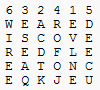
Columnar Transposition Cipher เป็นอัลกอริทึมที่คล้ายกับ Rail Fence Cipher ซึ่งมีความแตกต่างกันที่วิธีอ่านและเขียน โดยจะเขียนตามแนวแถว และอ่านตามแนวคอลัมน์ในเมตริกซ์ รวมทั้งลำดับคอลัมน์ในการอ่าน อัลกอรึทึมนี้อาจจะต้องเพิ่มการตรวจสอบ input จาก user ในการกรอก key เพราะต้องเป็นตัวเลขที่ไม่ซ้ำ แต่ต่อเนื่องและไม่ต้องเรียงลำดับ ซึ่งในที่นี้จะให้เริ่มที่ 1 ถึง 9
จากรูปซ้าย เมื่อเข้ารหัสแล้วจะได้ผลลัพธ์ ดังนี้ EVLNE ACDTK ESEAQ ROFOJ DEECU WIREE กรณีเมตริกซ์ไม่เต็ม แบบรูปขวา ให้อ่านข้ามช่องว่าง (ในโค้ดจะใส่ค่า Nothing ลงไป) ไปได้เลย ผลลัพธ์คือ EVLNA CDTES EAROF ODEEC WIREE

ตัวอย่างโค้ดการเข้ารหัส(Encrypt) แบบ Columnar Transposition Cipher

Function Encrypt(ByVal PlainText As String, ByVal Key As String) As String
'หาจำนวนคอลัมน์
Dim ColumnNum As Byte = Key.Length

'หาจำนวนแถว
Dim RowNum As Byte = PlainText.Length \ Key.Length
If (PlainText.Length Mod Key.Length) > 0 Then RowNum += 1

Dim CharMatrix(RowNum - 1, ColumnNum - 1) As Char
Dim CharArray(CharMatrix.Length - 1) As Char

'นำตัวอักษรใน PlainText มาเรียงในเมตริกซ์ (Array 2 มิติ)
'เรียงจากซ้ายไปขวาทีละแถว
Dim Count As Byte = 0
For CountRow As Byte = 0 To RowNum - 1
For CountCol As Byte = 0 To ColumnNum - 1
If Count <= PlainText.Length - 1 Then
CharMatrix(CountRow, CountCol) = PlainText(Count)
Count += 1
Else
CharMatrix(CountRow, CountCol) = Nothing
End If
Next CountCol
Next CountRow

'อ่านตัวอักษรในเมตริกซ์ จากบนลงล่าง ทีละคอลัมน์
'มาเรียงเป็นข้อความแถวเดียว
Count = 0
For CountCol As Byte = 1 To Key.Length
'หา column index ตามลำดับก่อนหลัง เก็บไว้ที่ตัวแปร ColumnOrder
Dim ColumnOrder As Byte
For ColumnOrder = 0 To Key.Length - 1
Dim Num As Byte = CByte(Key(ColumnOrder).ToString)
If CountCol = Num Then Exit For
Next ColumnOrder

For CountRow As Byte = 0 To RowNum - 1
If Not CharMatrix(CountRow, ColumnOrder) = Nothing Then
CharArray(Count) = CharMatrix(CountRow, ColumnOrder)
Count += 1
End If
Next CountRow
Next CountCol

'ส่งค่าตัวอักษรที่เป็น array กลับเป็น string
Return CharArray
End Function

ตัวอย่างโค้ดการถอดรหัส(Decrypt) แบบ Columnar Transposition Cipher

Function Decrypt(ByVal CipherText As String, ByVal Key As String) As String
'หาจำนวนคอลัมน์
Dim ColumnNum As Byte = Key.Length

'หาจำนวน cell ว่าง
Dim EmptyNum As Byte
Dim CharTotal As Byte = CipherText.Length
Dim Fraction As Byte = CharTotal Mod ColumnNum
EmptyNum = IIf(Fraction = 0, 0, ColumnNum - Fraction)

'หาจำนวนแถว
Dim RowNum As Byte = CipherText.Length \ Key.Length
If (CipherText.Length Mod Key.Length) > 0 Then RowNum += 1

Dim CharMatrix(RowNum - 1, ColumnNum - 1) As Char
Dim CharArray(CharMatrix.Length - 1) As Char

'นำตัวอักษรใน CipherText มาเรียงในเมตริกซ์ (Array 2 มิติ)
'เรียงจากบนลงล่าง ทีละคอลัมน
Dim Count As Byte = 0
For CountCol As Byte = 1 To Key.Length
'หา column index ตามลำดับก่อนหลัง เก็บไว้ที่ตัวแปร ColumnOrder
Dim ColumnOrder As Byte
For ColumnOrder = 0 To Key.Length - 1
Dim Num As Byte = CByte(Key(ColumnOrder).ToString)
If CountCol = Num Then Exit For
Next ColumnOrder

'คอมลัมน์ที่ไม่มีช่องว่าง
If ColumnOrder <= (Key.Length - 1 - EmptyNum) Then
For CountRow As Byte = 0 To RowNum - 1
CharMatrix(CountRow, ColumnOrder) = CipherText(Count)
Count += 1
Next CountRow
Else 'คอมลัมน์ที่มีช่องว่าง (Nothing)
For CountRow As Byte = 0 To RowNum - 2
CharMatrix(CountRow, ColumnOrder) = CipherText(Count)
Count += 1
Next CountRow
End If
Next CountCol

'อ่านตัวอักษรในเมตริกซ์ จากซ้ายไปขวา ทีละแถว
'มาเรียงเป็นข้อความแถวเดียว
Count = 0
For CountRow As Byte = 0 To RowNum - 1
For CountCol As Byte = 0 To ColumnNum - 1
If Count <= CipherText.Length - 1 Then
CharArray(Count) = CharMatrix(CountRow, CountCol)
Count += 1
End If
Next CountCol
Next CountRow

'ส่งค่าตัวอักษรที่เป็น array กลับเป็น string
Return CharArray
End Function

แหล่งข้อมูล :
Transposition cipher - wikipedia
Cryptography/Transposition ciphers - wikibooks
Transposition ciphers - Torbjörn Andersson
Columnar Transposition Ciphers - The Contest Center
Braingle - มีโปรแกรมให้เล่น